Knowing it will rain "today" isn't much use. What you want to know is whether it will rain at 6 pm, just as you head out.
Sola 1.0.19 puts it right on the left page: the weather for the next few hours, one swipe away from the home screen.
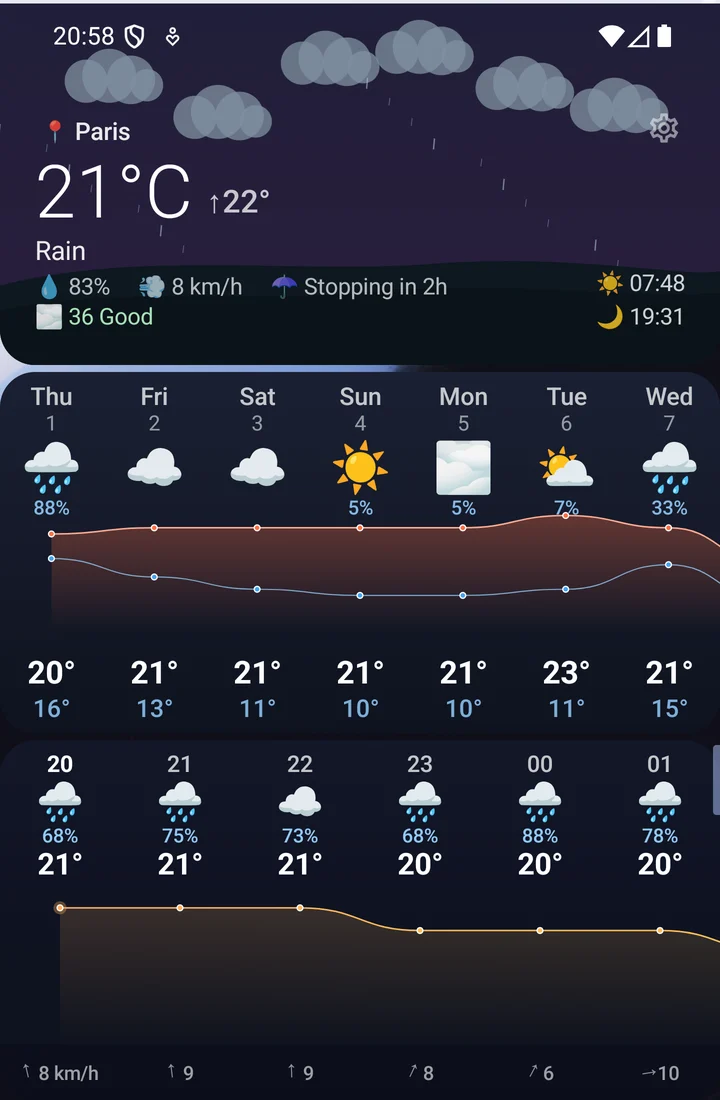
The next few hours, at a glance
For each upcoming hour: the conditions, the chance of rain, the temperature and the wind strength and direction. The temperature curve reads at a glance, without opening a single app.
The block is on by default. You can hide it, or rearrange the page, from the gear at the top right of the left page.
A sturdier home screen
Sola's rule hasn't changed: nothing should stutter, and nothing should crash. This release fixes three of them.
- A rare crash while drawing icons. At one very specific moment during startup, Sola could crash while displaying the dock icons. It's fixed, before it was ever seen on your phone.
- A crash right after restarting the phone. When Android connected Sola to your notifications before it was quite ready, the app could crash. It now waits its turn.
- Notification previews keep the sender's name. Under a messaging app's icon, the preview sometimes showed "Messages · " with nothing after it, when the app wrote the name in bold. The name now shows.
And since 1.0.16
Two stability releases went by quietly:
- 1.0.17: Sola no longer crashes when the phone restarts and it's the first thing to appear on screen.
- 1.0.18: clock widgets no longer bring Sola down when Android rebuilds the screen, for example when switching to dark mode in the evening.
How to get it
1.0.19 is rolling out through the Play Store. You can force a check from the Play Store app, under "Manage apps and device".
Open on Google Play